
A comprehensive technical breakdown of Android superuser implementations, system hooks, stealth capabilities, and ideal deployment scenarios.
Introduction
Rooting Android has undergone a massive structural shift over the past decade. The community moved from early binary injections into /system (SuperSU) to systemless boot image modifications in userspace (Magisk). Today, we are witnessing the third generation of Android root solutions: kernel-level privilege elevation (KernelSU) and hybrid kernel patching (APatch).
Understanding the technical differences between Magisk, KernelSU, and APatch is essential for power users, developers, and security researchers who need to balance superuser control with modern detection evasion (Play Integrity, SafetyNet, and banking app telemetry).
Architectural Deep Dive
1. Magisk SU: Userspace Dominance
Created by John Wu, Magisk operates entirely within userspace. It achieves root access by patching the boot image (boot.img or init_boot.img) to replace the system init binary with Magisk's custom init.

Execution Flow: Upon boot, Magisk's modified init mounts a tmpfs overlay over system files, injects its daemon (magiskd), and patches SELinux policies dynamically in memory.
Zygisk Integration: Magisk hooks into Android's zygote process (the base process from which all Android apps fork). This allows modules to run code directly inside the application process space.
Detection Profile: Because Magisk runs in userspace, anti-root solutions actively look for Magisk artifacts (e.g., hidden daemon sockets, modified mount namespaces, Zygisk trace points, system file overlays).
SPONSORED AD
2. KernelSU: Native Kernel Elevation
Developed by Weishu, KernelSU moves root privilege management directly into the Linux Kernel space. Rather than tricking userspace processes, KernelSU intercepts system calls at the kernel layer.

Execution Flow: KernelSU hooks the sys_execve system call inside kernel memory. When a process requests superuser access (via su), KernelSU evaluates the calling application's UID against an internal kernel-level allowlist. If authorized, it elevates the process credentials (struct cred) directly inside the kernel context.
GKI Requirement: KernelSU natively targets Android devices running Generic Kernel Image (GKI) kernels (Linux kernel versions 5.10+), though backports exist via custom kernel compilations.
Detection Profile: Because privilege granting happens strictly within kernel space, no userspace su daemon runs continuously. Applications without explicit root privileges cannot detect the presence of su binaries or modified system libraries.
3. APatch SU: The Hybrid Kernel-Patching Engine
APatch combines the universal compatibility of Magisk's boot patching with the kernel-level stealth of KernelSU. Powered by KernelPatch, APatch modifies kernel binary instructions directly within the boot image without requiring source-code kernel compilation.

Execution Flow: APatch uses KernelPatch to locate system call dispatchers (such as sys_call_table or inline instructions) in the existing compiled boot image and inserts dynamic hooks (Kprobes or inline trampolines).
SuperCall Mechanism: APatch replaces traditional su execution with a novel SuperCall interface. Applications communicate directly with the kernel hook using specific register flags to request privilege escalation.
Wide Compatibility: Unlike KernelSU, APatch works on both GKI (kernel 5.10+) and legacy non-GKI kernels (down to Linux Kernel 3.18), provided the boot image can be parsed.
Technical Comparison Matrix
Feature | Magisk SU | KernelSU | APatch SU |
|---|---|---|---|
| Execution Layer | Userspace (init patch) | Kernel Space (sys_execve hook) | Hybrid / Kernel Space (KernelPatch hook) |
Kernel Requirement | Any (Stock or Custom) | Linux 5.10+ (GKI) or Custom Kernel | Linux 3.18 to 6.x (Boot image patch) |
| Module Support | Magisk Modules (Zygisk) | KernelSU Modules + ZygiskNext | APatch Modules (APM) + ZygiskNext |
| Mount Namespace Isolation | Handled in Userspace | Native Kernel Isolation per App | Native Kernel Isolation per App |
| Bypass Capabilities | Requires Hide/DenyList/Modules | Exceptionally High (Default Invisible) | Extremely High (SuperCall Architecture) |
| Installation Method | Patching boot.img / init_boot | Flashing Custom Kernel / LKM | Patching boot.img with KernelPatch |
Key Feature Breakdown
Stealth and Anti-Root Evasion
Magisk: Requires extensive modular setup (Play Integrity Fix, Shamiko, Zygisk masking) to pass modern hardware-attested security checks. Userspace traces remain relatively vulnerable to aggressive telemetry.
KernelSU: Unregistered apps are completely blind to root. Mount namespace isolation ensures non-rooted apps cannot view modified files or mounted filesystems.
APatch: Offers kernel-level stealth similar to KernelSU. Because SuperCall doesn't rely on standard su binary paths in filesystem locations, security solutions fail to flag filesystem artifacts.
Module Ecosystems
Magisk: Benefits from a vast legacy library of modules. Zygisk provides deep framework-level modification capabilities (Xposed/LSPosed).
KernelSU & APatch: Both support standalone modular systems (KSU modules and APatch modules). Additionally, both can run ZygiskNext (a standalone Zygisk implementation), unlocking complete parity with Magisk's module library without relying on a userspace root daemon.
Ideal Use Cases & Recommendations
Choose Magisk SU if:
Legacy Device Support: You are rooting older Android devices (Android 11 or below) or devices with legacy kernels (pre-Linux 4.14).
Maximum Stability & Ecosystem Maturity: You rely heavily on legacy Magisk modules and prefer a well-documented tool with universal community support.
No Play Integrity Concerns: You do not run strict banking applications, enterprise MDM agents, or games with aggressive anti-cheat protections.
Choose KernelSU if:
Modern GKI Hardware: You own a newer device (Pixel 6+, Samsung Galaxy S22+, OnePlus 11+, etc.) running Android 12+ on a 5.10/5.15+ kernel.
Zero-Effort Banking/App Stealth: You want root capabilities while running high-security applications without spending hours configuring hiding modules.
Kernel Customization: You already build or flash custom kernels on your device.
Choose APatch SU if:
Non-GKI Device Seeking Kernel Stealth: You want kernel-level root performance and stealth on older or mid-range devices (Kernels 3.18 to 4.19) where KernelSU is unavailable.
Stock Firmware Compatibility: You want kernel-level root privileges without building a custom kernel from source code.
SPONSORED AD
Advanced Hooking Flexibility: You are a developer or researcher looking to leverage inline kernel hooks (KernelPatch) alongside standard root permissions.
Final Verdict
The Android rooting paradigm has evolved from modifying system partitions to patching userspace init, and finally to kernel-level privilege management.
Emerging Alternatives & Complementary Solutions
While permanent systemless and kernel-level root methods dominate modern Android customization, alternative superuser models exist to serve specific technical needs. These include temporary privilege escalation via kernel exploits—which grant volatile root access without modifying persistent boot partitions—as well as ADB and shell-level elevated access, which allow administrative interaction through developer interfaces without requiring full superuser binary injection.
1. Shizuku: Elevated API Access Without System Modification
Unlike traditional root implementations, Shizuku is not a root solution by itself. Instead, it acts as an API broker that exposes system-level permissions (ADB/shell or root context) directly to unprivileged user applications.
Operation Mechanism: Shizuku spawns a background service running with system ADB privileges (UID 2000) or full root permissions (UID 0) and uses Java Binder IPC to grant connected apps direct access to privileged Android APIs.
Detection Profile: Because Shizuku operates strictly through standard Android IPC channels and ADB debugging services, it leaves zero boot image or kernel modifications, making it invisible to anti-root and Play Integrity checks.
2. Shevery: Scripting and Shell Automation Engine
Built on top of modern superuser foundations, Shevery is a user-space automation utility designed to execute elevated shell scripts dynamically across different su environments (Magisk, KernelSU, and APatch).
Core Utility: It provides an abstracted execution layer for running root-level shell commands, system modifications, and environmental hooks without requiring custom app compilation or manual terminal interaction.
3. Origin SU: Firmware-Integrated Superuser Architecture
Origin SU refers to root access solutions embedded directly into custom Android ROM builds (such as LineageOS or custom vendor firmware) at compile time.
Architectural Integration: Built directly into the OS source code, Origin SU uses customized native su binaries and SELinux policies baked straight into the system image without relying on boot image patching or external overlay filesystems.
Trade-offs: Offers seamless system stability for development devices, but easily triggers legacy anti-root detections due to persistent filesystem /system/bin/su artifacts.
4. Temporary Root Methods: Vulnerability-Based Memory Escalation
Temporary root (temp root) exploits security vulnerabilities within kernel memory or system daemons to achieve short-term superuser privileges without unlocking the bootloader or writing to persistent boot partitions.
Exploitation Flow: Utilizes privilege escalation bugs (e.g., Dirty Pipe, Dirty COW) in runtime memory to temporarily overwrite process credentials or kernel structures. Privileges persist only until the device reboots.
Ideal Scenarios: Used primarily for bootloader unlocking on locked carrier variants, forensic analysis, or performing initial device backup before applying persistent root solutions.
While Magisk remains a versatile tool with massive ecosystem momentum, KernelSU and APatch represent the future of Android customization. By moving authorization enforcement into the kernel layer, modern root solutions provide vastly superior isolation, higher performance, and near-imperceptible signatures against corporate anti-root telemetry.
Boot Image / Kernel Patch Methods & Installation Process
Magisk SU Installation Process
Image Extraction: Extract the OEM firmware package and locate the stock boot image (boot.img or init_boot.img for Virtual A/B devices).
Userspace Patching: Transfer the image to the target device and use Magisk Manager to patch it. Magisk unpacks the boot ramdisk, inserts its custom init binary, injects SELinux policy rules, and repacks the image.
Flashing: Reboot to bootloader and flash the patched image via Fastboot (e.g., fastboot flash boot magisk_patched.img or fastboot flash init_boot magisk_patched.img).
KernelSU Installation Process
Kernel Integration: KernelSU source code is integrated into the Linux kernel tree at build time, or built as a Loadable Kernel Module (LKM).
Image Preparation: A custom kernel binary containing KernelSU (or a GKI boot image patched with KernelSU drivers) is compiled into a flashable boot.img or zip package.
Flashing: Flash the modified boot image using Fastboot or apply the kernel zip via custom recovery (TWRP/OrangeFox) or Kernel Flasher app.
SPONSORED AD
APatch SU Installation Process
Image Extraction & Key Setup: Obtain the stock boot.img and set a custom encryption key/supercall password within the APatch Manager app.
KernelPatch Binary Modification: APatch processes the stock boot image directly, using KernelPatch to embed hooks (Kprobes/trampolines) into kernel memory structures without altering userspace initialization binaries.
Flashing: Flash the generated apatch_patched.img to the boot partition via Fastboot.
Alternative Boot Image Patching Methods
Beyond standard Android-based manager apps, developers and power users utilize several alternative methods to modify boot images depending on their workflow and platform constraints:
CLI and Desktop Tooling (MagiskBoot & Android Image Kitchen): Advanced users often un-pack boot images manually using terminal tools like magiskboot or Android Image Kitchen. This method allows manual ramdisk editing, dtbo modifications, and custom init script injection directly on Linux or Windows desktops.
Custom Recovery Scripting (AnyKernel3): AnyKernel3 provides a standardized zip package structure that patches the target device's existing boot image directly inside custom recoveries (TWRP/OrangeFox). It unpacks, injects kernel binaries or ramdisk tweaks, and repacks without requiring a full stock image re-flash.
Automated CI/CD Patching Pipelines: Developer communities utilize automated cloud workflows (such as GitHub Actions) to compile custom kernels or build patched boot images directly from remote repositories upon source commit.
While these traditional alternatives require local binary setups, command-line proficiency, or custom recovery environments, modern web technology consolidates these diverse patching workflows into a unified platform through ImageForge.
ImageForge (forge.mysqil.com): Universal In-Browser Boot Image Patcher
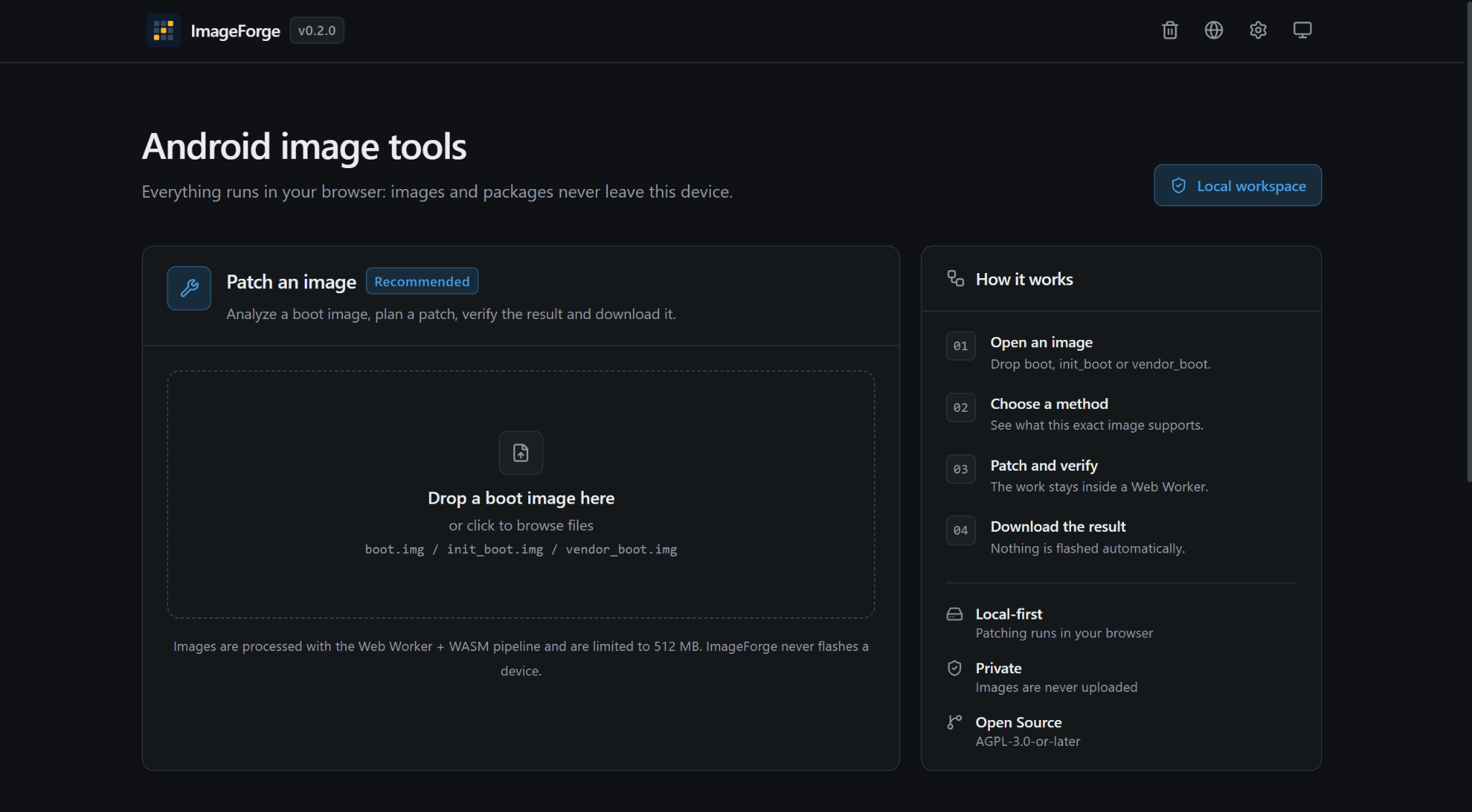
An emerging tool in the Android customization ecosystem is ImageForge (hosted at forge.mysqil.com). It serves as a browser-based utility that allows users to analyze, patch, repack, and inspect Android boot images and system archives without requiring command-line terminal setups or installing local binary dependencies.
1. Client-Side, Local-First Architecture
Zero-Upload Privacy: All operations execute locally inside the user's browser via WebAssembly (WASM) and Web Workers. Image files (such as boot.img, init_boot.img, or heavy OTA payload packages) are never uploaded to any remote server.
Offline Capabilities: Once the web page shell and WebAssembly modules are cached via Service Workers, ImageForge can function completely offline without active internet connectivity.
No Direct Flashing Safety Guarantee: ImageForge strictly operates as an image patcher and repacker. It never interacts with fastboot hardware protocols or directly flashes connected USB devices, ensuring users maintain manual control over target partitions.
2. Multi-Framework Boot Patching Capabilities
ImageForge supports automated patching across all major superuser management solutions and their respective community forks:
Magisk & Variants: Patches userspace initialization ramdisks with Magisk binaries, as well as customized forks (e.g., Magisk Alpha).
KernelSU & Custom Managers: Integrates with various KernelSU-family managers, embedding required drivers or ramdisk permissions.
APatch & KernelPatch Cores: Supports direct KernelPatch binary modification, allowing users to inject APatch hooks and custom SuperCall credentials directly into stock boot images.
3. Integrated Android Image Utilities
Beyond superuser patching, ImageForge provides a suite of local analysis and extraction tools:
OTA Payload Extraction: Reads official full OTA packages or vendor archives (e.g., payload.bin) directly in browser memory without unpacking multi-gigabyte archives to disk, extracting specific partition images (boot, init_boot, vendor_boot).
Partition Unpacking: Inspects and extracts files from dynamic super images, sparse images, EROFS, and EXT4 filesystems.
Boot Logo & Animation Editor: Parses vendor splash/logo images (such as MediaTek, OPPO, Realme, and OnePlus formats) and custom boot animations (bootanimation.zip), allowing users to preview, replace frame sequences, and repackage them.
Image Inspector & Diff Comparison: Compares two boot image builds byte-by-byte to highlight binary offset changes, headers, and existing patch signatures.
SPONSORED AD
4. Step-by-Step Workflow to Gain Root Access
Extract Boot Image: Obtain your device's stock OEM firmware or OTA package. Use ImageForge's Extract from a package tool to isolate the required boot.img or init_boot.img file.
Load Image in Patcher: Navigate to the Patch an Image section and drop the extracted boot image into the workspace.
Select Root Framework: Choose your target superuser method (Magisk, KernelSU, or APatch) and desired manager version/fork. Configure required options (such as APatch SuperCall credentials).
Process & Export: Execute the patch locally inside the Web Worker. Once verified, download the resulting patched image file (e.g., patched_boot.img).
Flash to Device: Boot the device into Fastboot mode using Android Platform Tools (or Minimal ADB and Fastboot) and flash the patched file to the appropriate boot partition using standard Fastboot commands (e.g., fastboot flash boot patched_boot.img or fastboot flash init_boot patched_boot.img). Alternatively, you can transfer the patched image file to your device's internal storage, boot into a custom recovery such as TWRP or OrangeFox, select Install, toggle the file selector to Install Image, select the patched image, and flash it to the Boot or Init Boot partition before rebooting.
Risks & Post-Rooting Challenges
While gaining full administrative control over an Android device unlocks unmatched customization and system-level flexibility, rooting inherently breaks fundamental Android security guarantees. Understanding these security trade-offs is essential before modifying core system components.
1. Security & Isolation Risks
Bypassing Application Sandboxing: Android relies on strict Application Sandboxing, Linux User IDs (UIDs), and SELinux policies to isolate applications from each other. Granting superuser permissions to a malicious or compromised application can bypass these boundaries, giving it full access to device storage, private keys, and system memory.
Hardware Security Delinking: Rooting and unlocking the bootloader permanently breaks the hardware-backed chain of trust verified by the device's Trusted Execution Environment (TEE) or Hardware Security Module (HSM/StrongBox).
OTA Update Complications: Seamless system updates (A/B updates) require modifying update scripts or restoring stock boot images before applying patches, as modified boot partitions will cause block-based OTA verifications to fail.
2. Common Issues Encountered After Rooting
Google Play Integrity API Failures: Replaces SafetyNet Attestation. Google tests for MEETS_BASIC_INTEGRITY, MEETS_DEVICE_INTEGRITY, and MEETS_STRONG_INTEGRITY. Rooted or bootloader-unlocked devices automatically fail device and strong integrity checks.
Google Play Store "Device Not Certified": When Play Integrity fails, Google Play Store drops the certified status of the device, blocking app installs or hides high-security applications (like Google Wallet or Netflix) from search results.
Banking & Enterprise Telemetry Detection: Financial applications employ advanced detection routines (e.g., checking for su binaries in PATH, active debuggers, modified mount points, isolated processes, or specific package names like com.topjohnwu.magisk).
Developer Options & USB Debugging Alerts: Certain banking and streaming apps enforce anti-tamper policies that explicitly refuse execution if Developer Options or USB Debugging (ADB) are toggled on in system settings.
In-Depth Remediation & Fixing Post-Root Detection
Fix 1: Bypassing Play Integrity & Device Attestation Failures
Install Play Integrity Fix (PIF): Flash the latest PlayIntegrityFix module (by chiteroman) via your root manager. This module dynamically spoofs certified device fingerprint data (build target, product model, security patch version) to force Google Play Services into evaluating integrity checks via basic software attestation rather than failed hardware key attestation.
Spoof Valid Keystore Fingerprints: Utilize community tools like pif.json generators or custom module forks to inject valid, unrevoked OEM key signatures into Google Play Services (com.google.android.gms).
IntegrityBox Module Integration: Alternatively, install the IntegrityBox module to automatically fetch, test, and apply working device fingerprints and key attestation spoofs, streamlining the process of maintaining hardware integrity pass states.
Fix 2: Resolving Google Play Store "Device Not Certified"
Clear Play Services & Store Data: After fixing Play Integrity, navigate to Settings > Apps > Google Play Store and select Clear Storage / Clear Data. Repeat the step for Google Play Services.
Register GSF Android ID (Step-by-Step Guide): If the Google Play Store remains uncertified after clearing app data, follow these steps to manually register your device with Google:
Obtain your GSF Android ID: Install a GSF ID reader application from a trusted source, or run the following command in a root terminal/ADB shell: sqlite3 /data/data/com.google.android.gsf/databases/gservices.db "SELECT value FROM main WHERE name='android_id';"
Copy the Decimal ID: Copy the numerical Google Services Framework (GSF) Android ID returned by the app or command output.
Navigate to the Registration Portal: Open a web browser and visit Google's Uncertified Device Portal at google.com/android/uncertified.
SPONSORED AD
Sign In & Submit: Log in with the primary Google Account registered on your Android device, paste your decimal GSF ID into the Google Services Framework Android ID field, and click Register.
Reboot & Clear Data: Wait a few minutes for the registration to process, clear storage for Google Play Store once more, and restart your device.
Fix 3: Circumventing Banking App & Advanced Telemetry Root Detection
Configure Process Hiding (DenyList / Target Isolation): If using Magisk, enable Zygisk and enforce the DenyList to target financial applications, Google Play Services, and Google Wallet. If using KernelSU or APatch, configure individual app permissions inside the manager's target list to prevent unprivileged apps from obtaining su access or seeing su paths.
Deploy Shamiko / ZygiskNext Masking Modules: Install stealth modules such as Shamiko (for Magisk/Zygisk) or standalone Zygisk layers on KernelSU/APatch. Shamiko completely hides traces of modified mount namespaces, Zygisk memory injections, and tmpfs overlays from applications even when DenyList enforcement is inactive.
Hide Root Manager Applications: Use the built-in repackaging feature inside Magisk Manager, KernelSU Manager, or APatch Manager to rename the manager app package with a randomized string (e.g., com.android.settings.stub).
Fix 4: Concealing Developer Options & ADB Debugging Settings
Use Xposed/LSPosed Masking Modules: Install LSPosed (via Zygisk) alongside modules like Hide My Applist (HMA) or DevOptsHide. These modules intercept system setting calls (e.g., Settings.Global.getInt(resolver, Settings.Global.DEVELOPMENT_SETTINGS_ENABLED)) and return 0 (disabled) exclusively to chosen target applications while keeping developer settings toggled on globally for system debugging.
SPONSORED ADSPONSORED AD
Conclusion
The choice between Magisk, KernelSU, and APatch ultimate hinges on your device architecture, kernel version, and security requirements. While Magisk offers maximum legacy flexibility across userspace, KernelSU and APatch represent a major leap forward by embedding authorization enforcement directly into the kernel layer. By combining modern kernel-level root frameworks with local browser patchers like ImageForge and essential evasion tools (Play Integrity Fix, Shamiko, LSPosed), power users can maintain total administrative authority over their Android devices without sacrificing daily usability, high-security app access, or system stability.
Comments (0)
Syncing authorization...