Noober Info
All Fixesguides and tutorialsAndroidguides and tutorialsAndroid Apps and Gamesguides and tutorialsCustom MODguides and tutorialsCustom ROMguides and tutorialsInformationguides and tutorialsInternet and Webguides and tutorialsMagiskguides and tutorialsPhone Fixesguides and tutorialsRecoverguides and tutorialsSmartphonesguides and tutorialsTech Newsguides and tutorialsWindows Solutionguides and tutorials
Home Blog About Publication Contact Us
TELEGRAM
Articles
Noober Info
EXPLORE
Trending Guides
AI & ROOT Tools
Tech Blog
Author Mode
STAY UPDATED
Push Notifications
Weekly Newsletter
GET MOBILE APP
Download on the App Store
GET IT ON Google Play
Buy me a Coffee
TRY AI GENERATOR
Home
Information
Clear Cache on Android - How to Clear Cache in Android 10 and Android 11
March 25, 2021
Follow on Google News

Clear Cache on Android - How to Clear Cache in Android 10 and Android 11

Are you searching clear cache option in Android Settings of Android 10 and Android 11? Clearing Cache on Android using this method has made it easy. Use this tool to clear cache on Android.

Ujjwal Murmu
Ujjwal Murmu AUTHOR
Global • 2 min read
PUBLISHED March 25, 2021
UPDATED March 25, 2021
LISTEN TO THIS ARTICLE Ready to listen
Informationcategory guides
Clear Cache on Android - How to Clear Cache in Android 10 and Android 11
Table of Contents
• No Clear Cache Option on Android 10 and Android 11• Clear Cache on Android 10 and Android 11
clear cache on android
Clear Cache on Android

No Clear Cache Option on Android 10 and Android 11

Clearing cached data is easy on Android. But why can't you find an option to clear the cache on Android? Specifically on Android 10 and 11. Because Google has removed the option to clear cache from Storage Manager under the settings. But worry not you can clear the cache on Android the other way.

Let's check out how to clear the cache on Android 10 and Android 11. I hope to see this feature back on Android 12, but time will tell if it's happening or not. So let's dive into the process.

Clear Cache on Android 10 and Android 11

To clear the cache on Android 10 and Android 11 you will need to download an app because we don't have this Clear Cache Option built-in.

Step 1: Download and Install Link2SD app from the play store ( not promoting the app but it's really useful )
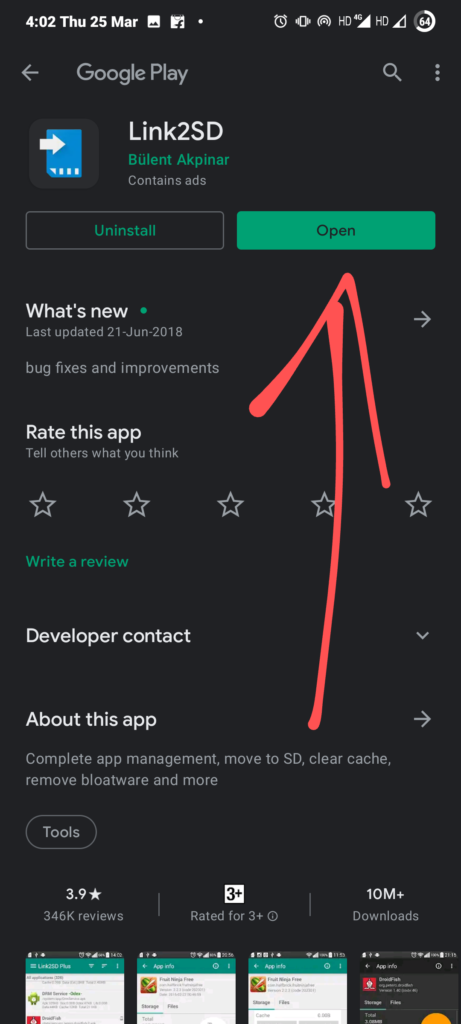
Clear Cache on Android Step 1

Step 2: Click on the hamburger icon or three lines that you see on the top left corner.
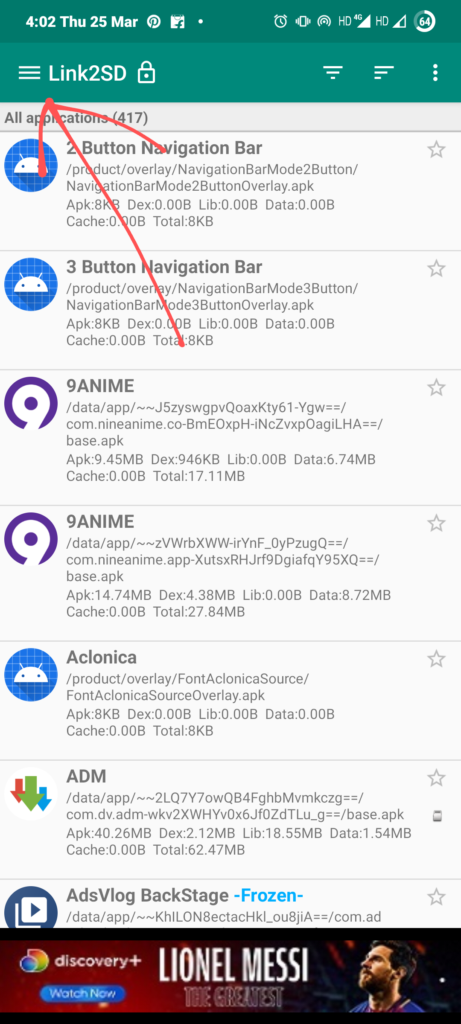
Clear Cache on Android Step 2

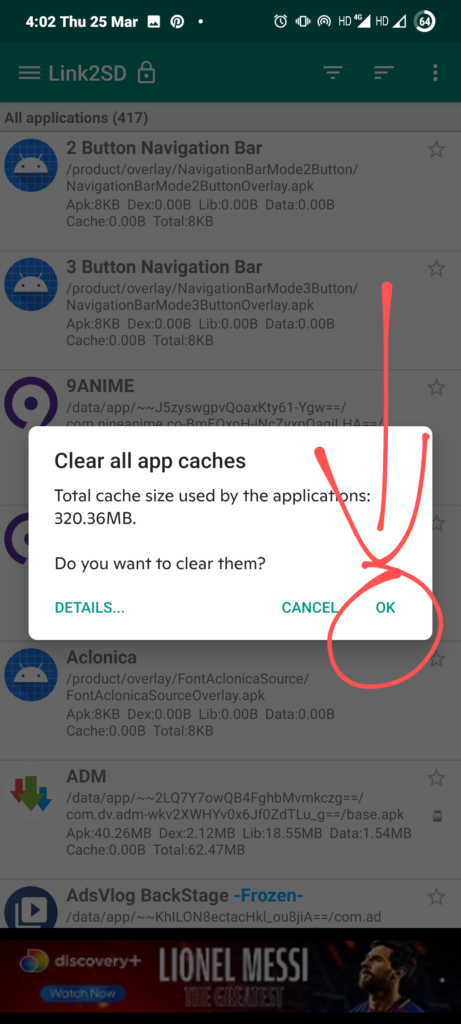
Step 3: Click on "Clear All Apps Caches", and it will ask you to confirm and Hit "Ok".
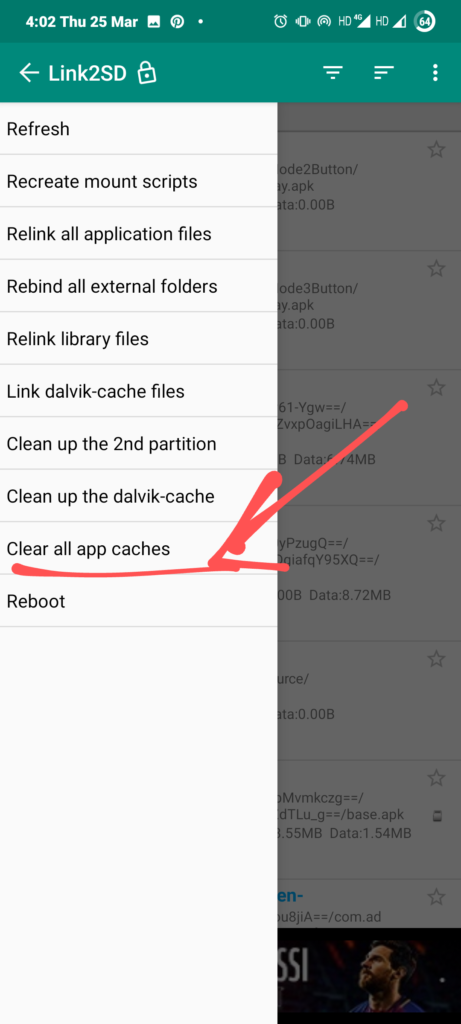
Clear Cache on Android Step 3
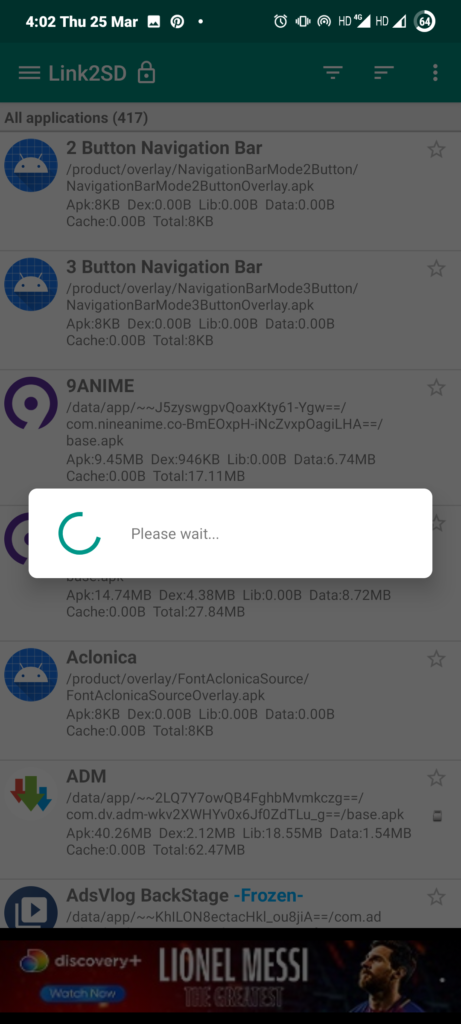
Clear Cache on Android Step 4
Clearing Cache on Android Process

Now, you have successfully cleared cache on Android and you are good to go. The App is not a very big file in size. It's about 5-10MB or less.
It is an app to Link Apps on SD Card, in case you have less Storage, but a clear cache option is also given because it's needed after you have moved apps to SD Card.

In case you want it as video form content then check this video out. All the steps are mentioned in the video.

Comment down below if this was an easy process or not. Yes - for easy, No - for not easy.
Was this article helpful?

Did you like the article, or was it helpful? Let us know your opinion by voting on 'Yes' or 'No'. Provide your feedback as well if you would like!
Ujjwal Murmu

Ujjwal Murmu

Author & Blogger

Passionate Android enthusiast, custom ROM developer, and tech blogger. Helping you unlock your device's potential with advanced guides, troubleshooting tutorials, and rooting walkthroughs.

ENJOYED THIS ARTICLE?

Join our newsletter to get the latest Android guides, rooting tutorials, and custom ROM updates directly in your inbox.

Tags:

Clear Cache on AndroidAndroid 10 Clear cacheAndroid 11 Clear Cache
← PREVIOUS POST IQOO Z3 5G Launched in China: Here Are The Internal Details and Price
NEXT POST → Mi 11 Pro, Mi 11 Ultra, and Mi 11 Lite Series Launch Date In India Revealed

Comments (0)

Syncing comments authorization state...

Loading comments...

Related Documentation

UFS 4.0 Technology announced – developed by Samsung Information
May 17, 2022 3 min read

UFS 4.0 Technology announced – developed by Samsung

Effect Of Internet Speeds on Various Applications Information
March 30, 2022 5 min read

Effect Of Internet Speeds on Various Applications

How to Generate Credit Card Number And its Uses? Information
March 9, 2022 2 min read

How to Generate Credit Card Number And its Uses?

nBERinfo

"In-depth guides, custom ROM installation walk-throughs, Android rooting tutorials, and system troubleshooting."

Quick Links

Home Blog About Us Li Nex Neo YT Videos & Reviews Contact Us

Company

About Publication Contact Sitemap RSS Feed Wanna write for us? Guest Posting

Legal

Terms of Service Privacy Policy Cookies Policy DMCA Takedown Disclaimer Affiliate Disclosure

Get in touch

Report Bug / Query
JOIN NOOBERINFO
LOG IN SIGN UP

Copyright © 2026 Noober Info. All Rights Reserved. Developed by Ujjwal Murmu.